
Devices in one place
Discover devices on the subnet, import cameras from a recorder and browse a clear NVR - XVR structure with connected cameras.
Device Management Unified Video Infrastructure Management
Cameras, recorders, firmware updates, backups, diagnostics and recordings — organized in one application. When standard sources are not enough, AI can support firmware search.
 Windows applicationDahua · BCS · HikvisionFree with no time limit
Explore the tabs and run simulations using sample data. The preview is scaled down so it fits comfortably on the page.
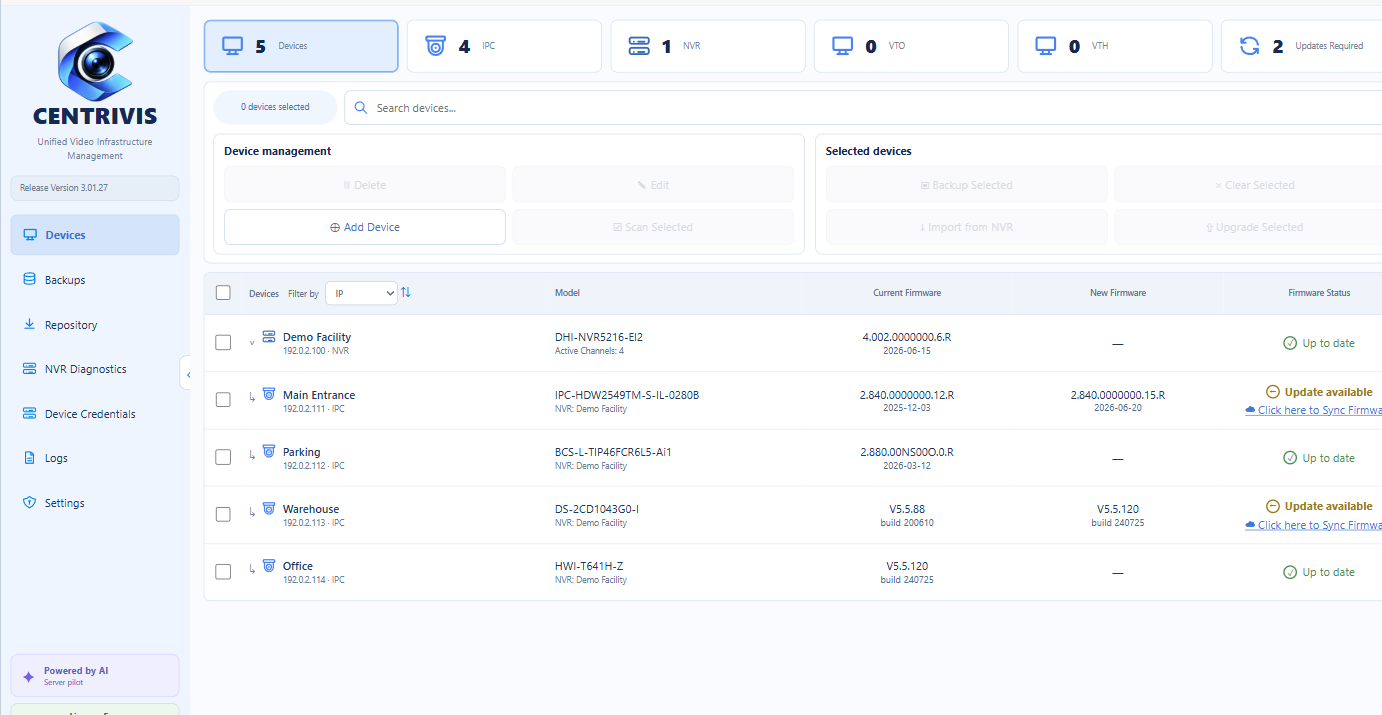
Sample data only · every operation in the Live Demo is simulated locally in your browser.
Different devices. One way to work.
* Feature availability depends on the model, firmware and services exposed by the device.
For installers, administrators and anyone who values time and ease of use.
Discover devices on the subnet, import cameras from a recorder and browse a clear NVR - XVR structure with connected cameras.
Device Management
Compare installed and available versions, sync only the packages you need and prepare updates for selected devices.
Firmware & Repository
Advanced search across available repositories, precise results and fast response to key customer needs.
AI-assisted Firmware Search Beta
Organize configuration backups by recorder and camera. Before restore, the application checks device model compatibility.
Backup & Restore
Check channels, status, disk health and capacity, and recording archive range. Use RTSP preview for the selected channel.
NVR Diagnostics
Choose a day in the calendar, zoom the timeline, select a range and save the required recording as an MP4 file.
NVR RecordsWhen standard search cannot find the right software or the manufacturer publishes several similar variants, AI helps select the right one. CENTRIVIS analyzes the model, hardware variant and available releases, then returns a report for verification.

Model, hardware variant and current firmware version.
AI-based analysis supports precise selection of the appropriate device update.
The application searches all available update sources and delivers the most relevant results.
The operator decides when and which devices to update.
From device identification to post-update version verification. Every step stays clear.
Scan the subnet or import channels from NVR - XVR.
Automatically detect device brand and type, then check for available updates.
Synchronize only the required files and protect the configuration before making changes.
Preparation, upload, device restart and post-update version check.
The dedicated NVR Records area combines channel selection, calendar and timeline in one view.
NVR Records Availability calendar
Quickly choose a day from the archive.
Precise timelineZoom, pan and select a range.
 MP4 export
File named with the recorder, channel and date.
Interface screenshot with demo data. Archive handling and export availability depend on the device.
Access credentials are stored in Windows Credential Manager and assigned to specific devices. Creating new users requires PIN authorization, and CENTRIVIS verifies that the account was actually created. The module is not used to change the administrator password.
The same application. Features and limits tailored to the size of your installation.
No expiration date — for small installations and core workflows.
Annual license for the full management and diagnostics feature set.
When Pro expires, the application returns to Free rules. Devices above the Free limit and Pro features remain locked until the license is activated again.
Key information about firmware, devices, access and licensing.
CENTRIVIS analyzes the device model, hardware variant and available releases. AI supports the selection of the appropriate update, while the operator remains in control of whether to apply it.
The project is developed primarily for Dahua and BCS. It also supports selected Hikvision features, including the evolving firmware module. Detecting a device through ONVIF does not mean that every management feature is available.
The application automatically detects the device brand and type, then compares the model, variant and version against the update repository. For supported devices it checks the full list of matching releases and verifies device/package compatibility before an update.
Yes. CENTRIVIS distinguishes between NVR and XVR recorders and supports analog channels. The available diagnostic information depends on the model and firmware version.
Yes, as long as the computer can reach the device address and required services. Preview, backup and recording export performance depends on the connection and recorder capabilities.
Free supports up to 8 devices and includes device management, updates, update storage and logs. Pro supports an unlimited number of devices and additionally provides NVR Diagnostics, NVR Records and Backups for one year. When the license expires, the application returns to Free rules.
Activation and license-status verification use the CENTRIVIS server. Communication with CCTV devices remains local; once internet access is available, the application can verify license validity.
No. It is the span between the beginning and end of the available archive, rounded to full days. It does not confirm continuous recording throughout the entire period.
 CENTRIVIS FOR WINDOWS
Start with Free. One place to manage devices, firmware updates, backups, diagnostics and everyday operations.
Download installerInstaller version 2.94.3 · Windows · 369.5 MiB · EXE